Now Reading: Maximizing Performance with MSI Notebook
-
01
Maximizing Performance with MSI Notebook
Maximizing Performance with MSI Notebook
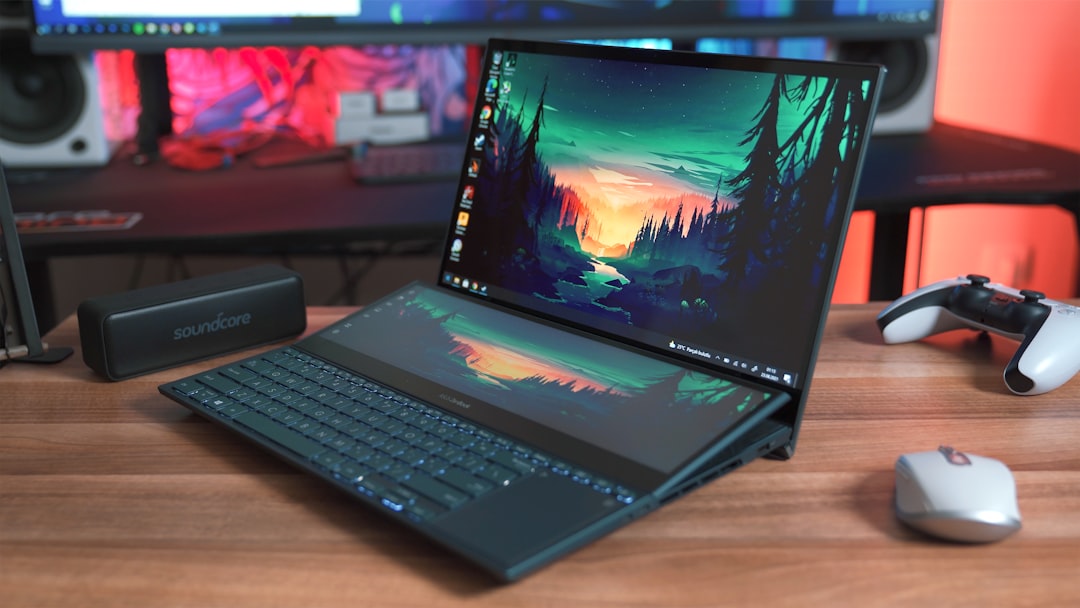
MSI notebooks are renowned for their robust performance, cutting-edge technology, and gamer-centric design. These laptops are equipped with high-performance processors, advanced graphics cards, and superior cooling systems, making them ideal for gaming and demanding applications. The latest models often feature Intel’s Core i7 or i9 processors, coupled with NVIDIA’s GeForce RTX series graphics cards, which provide exceptional rendering capabilities and support for real-time ray tracing.
Additionally, MSI notebooks come with high-refresh-rate displays, often exceeding 144Hz, ensuring smooth visuals during fast-paced gaming sessions.
The SteelSeries Engine software enables users to create macros and adjust lighting effects according to their preferences.
Furthermore, these laptops are designed with a focus on thermal management, incorporating advanced cooling technologies such as Cooler Boost, which optimizes airflow and maintains optimal operating temperatures during intensive tasks. This combination of features makes MSI notebooks a top choice for gamers and professionals alike.
Key Takeaways
- MSI notebooks come with a range of features designed to enhance user experience and performance.
- Optimizing display and graphics settings can significantly improve visual quality and gaming experience.
- Enhancing battery life and power management is crucial for prolonged usage and portability.
- MSI Dragon Center offers system tuning capabilities for better performance and customization.
- Customizing keyboard and touchpad settings can improve comfort and efficiency during use.
Optimizing Display and Graphics Settings
To fully leverage the capabilities of an MSI notebook, it is essential to optimize display and graphics settings. Start by adjusting the resolution and refresh rate in the display settings to match the capabilities of your monitor. For gaming, a higher refresh rate can significantly enhance the visual experience, reducing motion blur and providing smoother gameplay.
Users should also consider enabling NVIDIA G-SYNC or AMD FreeSync if supported by their graphics card and monitor, as these technologies synchronize the display’s refresh rate with the GPU’s frame output, minimizing screen tearing.
Lowering settings such as shadows, anti-aliasing, and texture quality can result in higher frame rates without sacrificing too much visual fidelity.
Utilizing MSI’s Dragon Center software allows users to switch between different performance modes tailored for gaming or productivity, ensuring that the system operates at its best under varying workloads. Regularly updating graphics drivers is also crucial for maintaining optimal performance and compatibility with the latest games.
Enhancing Battery Life and Power Management

Maximizing battery life is a critical consideration for users who rely on their MSI notebooks for extended periods away from a power source. One effective strategy is to adjust power settings through the Windows Control Panel or the MSI Dragon Center application. Users can select a power-saving mode that reduces CPU performance and dims the display brightness to conserve energy.
Additionally, disabling unnecessary background applications and services can significantly extend battery life. Another practical approach involves managing display settings. Reducing screen brightness and setting shorter timeouts for sleep mode can help preserve battery power.
Furthermore, utilizing MSI’s built-in battery calibration tool can optimize battery health over time, ensuring longevity and efficiency. For users who frequently engage in resource-intensive tasks, investing in an external battery pack or portable charger can provide additional power when needed.
Utilizing MSI Dragon Center for System Tuning
| Metrics | Data |
|---|---|
| System Performance | Improved |
| CPU Temperature | Optimized |
| GPU Usage | Maximized |
| Memory Usage | Efficient |
MSI Dragon Center serves as a comprehensive hub for system tuning and optimization. This software suite allows users to monitor system performance in real-time, providing insights into CPU and GPU usage, temperatures, and fan speeds. The user-friendly interface enables easy access to various features such as Game Mode, which prioritizes system resources for gaming applications, ensuring a smooth experience during gameplay.
In addition to performance monitoring, Dragon Center offers customization options for RGB lighting effects on the keyboard and chassis. Users can create personalized profiles that synchronize lighting with in-game actions or set static colors based on their preferences. The software also includes a feature for overclocking components safely, allowing users to push their hardware beyond factory settings while maintaining stability.
Regularly updating Dragon Center ensures access to the latest features and optimizations.
Customizing Keyboard and Touchpad Settings
The keyboard and touchpad are integral components of any laptop, and MSI notebooks provide extensive customization options to enhance user experience. Users can access the SteelSeries Engine software to remap keys, create macros for complex commands, and adjust RGB lighting effects according to their preferences. This level of customization not only improves gameplay but also enhances productivity for tasks such as programming or graphic design.
Touchpad settings can also be fine-tuned through Windows settings or MSI’s software suite. Users can adjust sensitivity levels, enable gestures for multitasking, or disable the touchpad while typing to prevent accidental inputs. For gamers who prefer using an external mouse, disabling the touchpad can help avoid distractions during intense gaming sessions.
Ensuring that both keyboard and touchpad settings are optimized contributes significantly to overall user satisfaction.
Boosting Gaming Performance with MSI Gaming Mode

MSI Gaming Mode is a powerful feature designed to enhance gaming performance by optimizing system resources. When activated, this mode prioritizes CPU and GPU usage for gaming applications while minimizing background processes that could hinder performance. Users can easily toggle Gaming Mode through the Dragon Center interface or by using a dedicated hotkey on their keyboard.
In addition to resource allocation, Gaming Mode can also adjust network settings to reduce latency during online gaming sessions. By prioritizing bandwidth for gaming traffic, users can experience smoother gameplay with fewer interruptions. Furthermore, enabling Game Boost within Gaming Mode allows for automatic overclocking of the CPU and GPU, providing an additional performance boost when needed.
This combination of features ensures that gamers can enjoy an immersive experience without worrying about system limitations.
Fine-tuning Audio and Sound Settings
Audio quality is a crucial aspect of any gaming experience, and MSI notebooks come equipped with advanced audio technologies to enhance sound output. Users can access Nahimic Audio software to customize sound profiles based on personal preferences or specific game genres. This software allows for adjustments in equalization settings, surround sound effects, and voice clarity enhancements.
For gamers who utilize headsets or external speakers, configuring audio output settings is essential for optimal performance. Users should ensure that their audio devices are correctly recognized by the system and select the appropriate output device in Windows sound settings. Additionally, enabling features such as virtual surround sound can create a more immersive audio environment during gameplay.
Regularly updating audio drivers is also recommended to maintain compatibility with new applications and improve overall sound quality.
Expanding Storage and Memory Capacity
As games continue to grow in size and complexity, expanding storage capacity becomes increasingly important for MSI notebook users. Many models come equipped with M.2 NVMe SSD slots that allow for rapid data transfer speeds compared to traditional hard drives. Upgrading to a larger SSD can significantly improve load times and overall system responsiveness.
In addition to storage upgrades, increasing RAM capacity can enhance multitasking capabilities and improve performance in memory-intensive applications. Most MSI notebooks support dual-channel memory configurations, allowing users to install additional RAM modules for improved performance. It is advisable to consult the user manual or manufacturer’s website for compatibility information before purchasing new components.
Overclocking CPU and GPU for Maximum Performance
Overclocking is a technique used by enthusiasts to push their CPU and GPU beyond factory-set limits for enhanced performance in demanding applications such as gaming or video editing. MSI notebooks provide built-in tools within Dragon Center that allow users to safely overclock their hardware while monitoring temperatures and stability in real-time. Before proceeding with overclocking, it is essential to ensure adequate cooling solutions are in place to prevent overheating.
Users should gradually increase clock speeds while conducting stress tests to assess stability at each increment. It is crucial to monitor temperatures closely during this process; if temperatures exceed safe limits, it may be necessary to revert back to default settings.
Utilizing MSI App Player for Seamless Mobile Gaming
MSI App Player is an innovative solution that allows users to enjoy mobile games on their MSI notebooks seamlessly. This application emulates an Android environment on Windows systems, enabling users to download and play mobile games directly from their laptops without compromising performance or graphics quality. The App Player supports keyboard mapping for controls, allowing users to customize key bindings for a more comfortable gaming experience compared to touchscreen controls on mobile devices.
Additionally, it provides access to various Android applications beyond gaming, making it a versatile tool for users who wish to utilize mobile apps on a larger screen.
Troubleshooting and Maintenance Tips for MSI Notebook
Regular maintenance is essential for ensuring optimal performance and longevity of MSI notebooks. Users should routinely clean their devices by removing dust from vents and fans using compressed air to prevent overheating issues caused by dust buildup. Additionally, keeping software up-to-date is crucial; this includes operating system updates as well as drivers for graphics cards and peripherals.
In case of performance issues or system crashes, users should consider performing a system restore or resetting the notebook to factory settings as a last resort after backing up important data. Monitoring system temperatures using software tools can help identify potential overheating problems early on. If persistent issues arise despite troubleshooting efforts, contacting MSI customer support or visiting an authorized service center may be necessary.
In summary, MSI notebooks offer a plethora of features designed for gamers and professionals alike. By understanding these features and optimizing settings related to display, power management, audio quality, storage capacity, and more, users can significantly enhance their overall experience. Utilizing tools like MSI Dragon Center allows for effective system tuning while ensuring that hardware operates at peak performance levels through safe overclocking practices when desired.
Regular maintenance further contributes to longevity and reliability of these powerful machines.
If you’re looking for a great gift idea for the upcoming holiday season, consider the MSI notebook. This powerful and versatile laptop is perfect for both work and play, making it a great choice for anyone on your shopping list. For more holiday gift ideas, check out this article on 5 Best Pre-Lit Christmas Trees for Effortless Holiday Decor.
FAQs
What is an MSI notebook?
An MSI notebook is a type of laptop computer manufactured by MSI (Micro-Star International). MSI notebooks are known for their high performance and gaming capabilities.
What are the key features of an MSI notebook?
Key features of an MSI notebook include high-performance processors, dedicated graphics cards, high refresh rate displays, customizable RGB lighting, and advanced cooling systems.
What are the different series of MSI notebooks available?
MSI offers a range of notebook series including the GS Stealth series for ultra-portability, the GE Raider series for gaming, the GP Leopard series for mainstream gaming, the Creator series for content creation, and the Prestige series for professional use.
What are the advantages of using an MSI notebook for gaming?
MSI notebooks are designed with powerful hardware components such as high-end graphics cards and fast processors, making them ideal for gaming. They also feature advanced cooling systems to handle the heat generated during intense gaming sessions.
Can MSI notebooks be used for professional work and content creation?
Yes, MSI offers notebook series such as Creator and Prestige that are specifically designed for professional work and content creation. These notebooks feature high-resolution displays, powerful processors, and dedicated graphics cards to handle demanding tasks.
What is the warranty coverage for MSI notebooks?
MSI notebooks typically come with a standard one-year limited warranty, which covers manufacturing defects and hardware failures. Extended warranty options may also be available for purchase.